
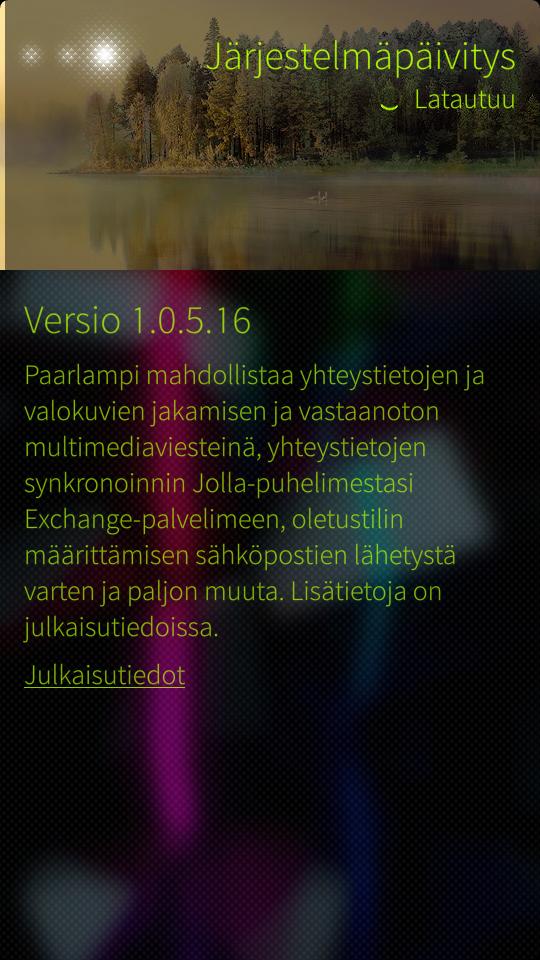
Jolla on juuri julkaissut uusimman kuukausittaisen päivityksensä Sailfishiin. Päivitys on nimeltään Paarlampi 1.0.5.16 ja se on kokonaisuudessaan viides päivitys. Uusin päivityksessä on nyt myös mukana MMS mahdollisuus.
MMS-viestintä on testattu vain suomalaisilla teleoperaattoreilla ja se toimii ainakin suomessa hyvin. Kuviin voi nyt myös tallentaa paikkatiedon GPS:n avulla.
MUISTUTUS:
Jos käytössäsi on aiempi versio Sailfishistä, kun 1.0.4.20 ja olet asentanut Warehouse sovelluksen, niin muista ottaa open repos repositories pois päältä!! Lue TÄMÄ ohje siitä, miten se tehdään.
Tässä suurimmat muutokset mitä päivitys tuo mukanaan:
THE CHANGELOG:
- Two-way sync of Exchange contacts
- Over-the-air (OTA) provisioning: Receive mobile data and MMS access point settings from your operator over-the-air
- Share and receive pictures and contacts via MMS (experimental 1)
- EXIF data is now stored in photos taken with camera.
- Save GPS coordinates in captured photos [Settings->Apps->Camera]
- Set default account to be used for sending emails [Settings->Apps->Email]
- Swipe to close gesture available as a setting and disabled by default for new users [Settings->System->Shortcuts]
- Visual interaction hints in events view, browser, camera, email, phone and messages apps
- Keyboard sounds [Settings->System->Sounds and feedback->Touch screen tones]
Päivitys korjaa myös liudan bugeja ja Sailfish-käyttöjärjestelmä toimii Jollassa entistä paremmin.
Täydet tiedot päivityksen tuomista muutoksista:
HIGHLIGHTS OF OTHER IMPROVEMENTS:
SECURITY
Fixed OpenSSL “heartbleed” bug (CVE-2014-0160)
SETTINGS
Provides Exchange account setting for two-way contact synchronization
Option to clear learned words from text prediction database [Settings->System->Text input]
Disabled accounts now appear dimmed and non-selectable in the presence selection view
Allows enabling GPS in flight mode
CONNECTIVITY
Connection indicator in home screen now supports dual connection of WLAN and mobile data (one connection online, another ready-to-use)
Fixes issue where disabling mobile data connection mid-way through a data sync (e.g.: scheduled sync of emails, social media etc) re-activated mobile data at the next scheduled automatic sync interval specified by the user, or when a user manually triggered a new sync.
ANDROID RUNTIME
Visual indication in the launcher on android apps when Android runtime is being upgraded
Proper support of updating and uninstallation of Android apps
Swipe gestures to close and minimize apps now follow orientation of the android apps
Fixes security vulnerabilities – Android Bugs 9695860,10148349
Supports android apps that use android camera apps directly instead of the camera API
Android audio volume normalized
Supporting sending SMS via Android apps
Improved 2D/3D performance
CALENDAR
Delete all occurrences of a recurring calendar event
CAMERA
Disables swipe gesture to access camera roll while recording video
Graphics improvement to timers and shutter key
CLOCK & ALARM
Provision for the alarm to ring when the phone has shutdown in battery low condition
Tapping clock and calendar alarm dialogs now displays animation hint to use the pulleys (also in incoming call, Class 0 SMS, Supplementary Services dialogs)
VISUAL IMPROVEMENTS
Visual refresh for the preloaded Ambience photos and colors
Display page edges when moving between application pages
Haptic feedback on shutting down the phone
HOMESCREEN, LOCK SCREEN, EVENTS VIEW, NOTIFICATIONS
Plays sounds only for high priority notifications (i.e missed call, chat, SMS, MMS, voice mail and email) when the device is locked
Displays busy indicator on top of application being uninstalled or updated (same hint as when you install new app)
Flicking horizontally on lock screen now displays animation hint to unlock with a flick up (same hint as when you tap the lock screen)
VIRTUAL KEYBOARD
Plays sound feedback on interacting with keys
STORE CLIENT
Notifies Jolla about developer mode activation for the Jolla account configured on the device
Disables stepping back when the OS update download is ongoing
Provides ‘Create new email message’ option directly from the main view via pulley menu
Displays placeholder text for To, Cc and Bcc fields until text is entered
Improves picking recipients while composing mails
MESSAGES
Receive photos and contacts (vCard) via MMS
Improves entering recipients on a new message
PEOPLE
Allows display/edit of ‘Title’ field in Exchange contacts
Updates context menu in contact picker to allow ‘Edit’ and ‘Add to favorites’ actions
GALLERY
Updates highlight colors of default 9 ambiance
Provides image editing view in landscape mode
Displays ambience settings immediately after creating a new ambience
THE OTHER HALF
Wakes up display when switching TOH covers
Allows configuring sound settings associated with TOH ambience
STARTUP WIZARD
Startup wizard now explicitly provides feedback when the user wants to skip creating a Jolla account
KNOWN ISSUES
Call forwarding options are not visible in the UI though they are set. Until we find a fix, please use the GSM service codes from the phone dialer to verify your settings. Referhttp://en.wikipedia.org/wiki/Call_forwarding#Keypad_codes for useful codes.
Settings app takes some time before it loads completely after boot.
EXIF info of the photos is not visible in the Gallery.
Occasionally, the device may have problems connecting to internet when the device is connected to both WLAN and mobile data networks. We have a fix in the pipeline.
Some of the device reboot issues have been addressed though it does not eliminate the problem completely. We are striving to find a fix to resolve the issue permanently. Please contact Jolla Care at [email protected] if there are severe issues on your device.
For more details about bug fixes please visit together.jolla.com
Pingback: Jolla - Paarlampi | P.Tärkeä - Poliitillinen ploki()